Cette page ne doit être appliquée que si le script vous demande de passer la migration manuelle code.20260807.FORMS.AddPDFExport
A partir de la version 2.30.0 du plugin Forms, il est possible d'exporter une entrée de formulaire au format PDF dans les différents tableau de bord.
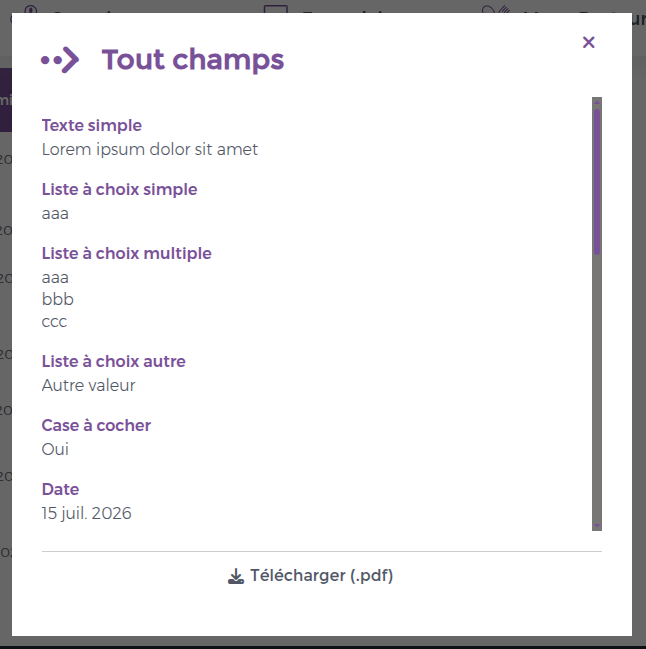
Lien de téléchargement Personnalisation du PDF Lien de téléchargement Sur les deux services Mes Soumissions et Tableau de Bord , le lien Télécharger (.pdf) est présent dans la boite de dialogue qui permet d'afficher les données de l'entrée.
Voici un exemple de rendu :
Si ce bouton n'est pas présent, c'est que vous avez une surcharge de ces services dans votre charte graphique. Il faut donc ajouter le template download-entry-pdf à deux endroits différents :
Le template show-answer-popup
<!-- Download link is auto-generated when showing answer -->
<xsl:call-template name="download-entry-pdf" />
<!-- Download link is auto-generated when showing answer -->
<xsl:call-template name="download-entry-pdf" />
<!-- Download link is auto-generated when showing answer -->
<xsl:call-template name="download-entry-pdf" /> Voici un exemple d'intégration de la charte Intranet
<xsl:template name="show-answer-popup">
<div class="dashboard-popup dashboard-entry-answers" data-dashboard-popup="{$uniqueId}" data-dashboard-entry-answers="{$uniqueId}" style="display:none;" role="dialog" aria-modal="true" aria-labelledby="dashboard-entry-answers-title-{$uniqueId}">
<button type="button" onclick="onHideEntry_{$uniqueId}()" class="close" title="skin.{$skin}:SKIN_SERVICES_FORMS_DASHBOARD_CLOSE" i18n:attr="title"><i class="fas fa-times" aria-hidden="true"></i></button>
<h1 class="header" id="dashboard-entry-answers-title-{$uniqueId}" data-dashboard-entry-values-title="{$uniqueId}" data-dashboard-title-attr="true"></h1>
<div class="innercontent" data-dashboard-entry-values="{$uniqueId}">
<!-- Rendered by entry-information.xsl -->
</div>
<div class="bottom">
<!-- Download link is auto-generated when showing answer -->
<xsl:call-template name="download-entry-pdf" />
</div>
</div>
</xsl:template> <xsl:template name="show-answer-popup">
<div class="dashboard-popup dashboard-entry-answers" data-dashboard-popup="{$uniqueId}" data-dashboard-entry-answers="{$uniqueId}" style="display:none;" role="dialog" aria-modal="true" aria-labelledby="dashboard-entry-answers-title-{$uniqueId}">
<button type="button" onclick="onHideEntry_{$uniqueId}()" class="close" title="skin.{$skin}:SKIN_SERVICES_FORMS_DASHBOARD_CLOSE" i18n:attr="title"><i class="fas fa-times" aria-hidden="true"></i></button>
<h1 class="header" id="dashboard-entry-answers-title-{$uniqueId}" data-dashboard-entry-values-title="{$uniqueId}" data-dashboard-title-attr="true"></h1>
<div class="innercontent" data-dashboard-entry-values="{$uniqueId}">
<!-- Rendered by entry-information.xsl -->
</div>
<div class="bottom">
<!-- Download link is auto-generated when showing answer -->
<xsl:call-template name="download-entry-pdf" />
</div>
</div>
</xsl:template>
<xsl:template name="show-answer-popup">
   <div class="dashboard-popup dashboard-entry-answers" data-dashboard-popup="{$uniqueId}" data-dashboard-entry-answers="{$uniqueId}" style="display:none;" role="dialog" aria-modal="true" aria-labelledby="dashboard-entry-answers-title-{$uniqueId}">
     <button type="button" onclick="onHideEntry_{$uniqueId}()" class="close" title="skin.{$skin}:SKIN_SERVICES_FORMS_DASHBOARD_CLOSE" i18n:attr="title"><i class="fas fa-times" aria-hidden="true"></i></button>
     <h1 class="header" id="dashboard-entry-answers-title-{$uniqueId}" data-dashboard-entry-values-title="{$uniqueId}" data-dashboard-title-attr="true"></h1>

     <div class="innercontent" data-dashboard-entry-values="{$uniqueId}">
        <!-- Rendered by entry-information.xsl -->
     </div>

     <div class="bottom">
        <!-- Download link is auto-generated when showing answer -->
        <xsl:call-template name="download-entry-pdf" />
     </div>

 </div>
</xsl:template>
Le template action[@type='edit-by-submitter']
<!-- Download link is auto-generated when showing answer -->
<xsl:call-template name="download-entry-pdf" >
   <xsl:with-param name="dataId" select="concat($uniqueId, concat('-', ../@id))"/>
</xsl:call-template>
<!-- Download link is auto-generated when showing answer -->
<xsl:call-template name="download-entry-pdf" >
<xsl:with-param name="dataId" select="concat($uniqueId, concat('-', ../@id))"/>
</xsl:call-template>
<!-- Download link is auto-generated when showing answer -->
<xsl:call-template name="download-entry-pdf" >
   <xsl:with-param name="dataId" select="concat($uniqueId, concat('-', ../@id))"/>
</xsl:call-template> Voici un exemple d'intégration de la charte Intranet
<xsl:template match="action[@type='edit-by-submitter']" mode="action-dialog">
<div class="dashboard-popup dashboard-edit" data-dashboard-popup="{$uniqueId}" data-dashboard-edit-dialog="{../@formId}-{../@id}-{@id}" style="display:none;" role="dialog" aria-modal="true" aria-labelledby="dashboard-popup-header-{generate-id()}">
<h1 class="header" id="dashboard-popup-header-{generate-id()}"><xsl:value-of select="."/></h1>
<div class="innercontent">
<div data-dashboard-edit-values="{../@formId}-{../@id}-{@id}">
<!-- Rendered by edit.xsl -->
</div>
<xsl:apply-templates select="." mode="action-dialog-loader"/>
</div>
<div class="bottom">
<!-- Download link is auto-generated when showing answer -->
<xsl:call-template name="download-entry-pdf" >
   <xsl:with-param name="dataId" select="concat($uniqueId, concat('-', ../@id))"/>
</xsl:call-template>
<div class="buttons">
<button type="button" class="btn" onclick="DashboardHelper.editFormEntry('{$uniqueId}', '{../@formId}', '{../@id}', '{@id}'>
<span><i18n:text i18n:key="PLUGINS_FORMS_SERVICE_DASHBOARD_OK_BUTTON" i18n:catalogue="plugin.forms"/></span>
</button>
<button type="button" class="btn" onclick="onHideActionDialog_{$uniqueId}()">
<span><i18n:text i18n:key="PLUGINS_FORMS_SERVICE_DASHBOARD_CANCEL_BUTTON" i18n:catalogue="plugin.forms"/></span>
</button>
</div>
</div>
</div>
</xsl:template> <xsl:template match="action[@type='edit-by-submitter']" mode="action-dialog">
<div class="dashboard-popup dashboard-edit" data-dashboard-popup="{$uniqueId}" data-dashboard-edit-dialog="{../@formId}-{../@id}-{@id}" style="display:none;" role="dialog" aria-modal="true" aria-labelledby="dashboard-popup-header-{generate-id()}">
<h1 class="header" id="dashboard-popup-header-{generate-id()}"><xsl:value-of select="."/></h1>
<div class="innercontent">
<div data-dashboard-edit-values="{../@formId}-{../@id}-{@id}">
<!-- Rendered by edit.xsl -->
</div>
<xsl:apply-templates select="." mode="action-dialog-loader"/>
</div>
<div class="bottom">
<!-- Download link is auto-generated when showing answer -->
<xsl:call-template name="download-entry-pdf" >
<xsl:with-param name="dataId" select="concat($uniqueId, concat('-', ../@id))"/>
</xsl:call-template>
<div class="buttons">
<button type="button" class="btn" onclick="DashboardHelper.editFormEntry('{$uniqueId}', '{../@formId}', '{../@id}', '{@id}'>
<span><i18n:text i18n:key="PLUGINS_FORMS_SERVICE_DASHBOARD_OK_BUTTON" i18n:catalogue="plugin.forms"/></span>
</button>
<button type="button" class="btn" onclick="onHideActionDialog_{$uniqueId}()">
<span><i18n:text i18n:key="PLUGINS_FORMS_SERVICE_DASHBOARD_CANCEL_BUTTON" i18n:catalogue="plugin.forms"/></span>
</button>
</div>
</div>
</div>
</xsl:template>
<xsl:template match="action[@type='edit-by-submitter']" mode="action-dialog">
 <div class="dashboard-popup dashboard-edit" data-dashboard-popup="{$uniqueId}" data-dashboard-edit-dialog="{../@formId}-{../@id}-{@id}" style="display:none;" role="dialog" aria-modal="true" aria-labelledby="dashboard-popup-header-{generate-id()}">
     <h1 class="header" id="dashboard-popup-header-{generate-id()}"><xsl:value-of select="."/></h1>
     <div class="innercontent">
        <div data-dashboard-edit-values="{../@formId}-{../@id}-{@id}">
           <!-- Rendered by edit.xsl -->
        </div>

        <xsl:apply-templates select="." mode="action-dialog-loader"/>
     </div>

     <div class="bottom">
        <!-- Download link is auto-generated when showing answer -->
        <xsl:call-template name="download-entry-pdf" >
           <xsl:with-param name="dataId" select="concat($uniqueId, concat('-', ../@id))"/>
        </xsl:call-template>

        <div class="buttons">
           <button type="button" class="btn" onclick="DashboardHelper.editFormEntry('{$uniqueId}', '{../@formId}', '{../@id}', '{@id}'>
               <span><i18n:text i18n:key="PLUGINS_FORMS_SERVICE_DASHBOARD_OK_BUTTON" i18n:catalogue="plugin.forms"/></span>
           </button>
           <button type="button" class="btn" onclick="onHideActionDialog_{$uniqueId}()">
              <span><i18n:text i18n:key="PLUGINS_FORMS_SERVICE_DASHBOARD_CANCEL_BUTTON" i18n:catalogue="plugin.forms"/></span>
           </button>
        </div>
     </div>
 </div>
</xsl:template> Si au contraire le lien de téléchargement est visible mais non souhaité, vider le template XSL <xsl:template name="download-entry-pdf"/>
Personnalisation du PDF Le PDF de rendu d'une entrée a été intégré pour les chartes Intranet, Intranet Cards, Intranet Search et ODF Orientation avec le logo et les couleurs Ametys. Il faut appliquer une surcharge coté projet pour y mettre les couleurs et le logo propres au projet.
Pour les logos
Il faut appliquer une surcharge sur le fichier entry2fo.xsl
Voici un exemple d'intégration de la charte Intranet
<xsl:import href="plugin:forms://stylesheets/forms/pdf/entry2fo.xsl"/>

<xsl:variable name="skin" select="ametys:skin()"/>

<xsl:template name="xsl-region-before">
 <fo:static-content flow-name="xsl-region-before" space-after="1cm">
     <xsl:call-template name="xsl-region-before-content"/>
 </fo:static-content>
</xsl:template>

<xsl:template name="xsl-region-before-content">
 <fo:block margin-top="0cm" margin-right="1.5cm" margin-left="1.5cm">
     <fo:external-graphic src="url('skin:{$skin}://resources/templates/common/img/logo-colorful.svg')" content-width="scale-to-fit" content-height="1.5cm" vertical-align="top" margin-left="1cm"/>
     <fo:external-graphic src="url('skin:{$skin}://resources/templates/common/img/header.png')" width="14.99cm" height="2cm" content-width="scale-to-fit" />
 </fo:block>
</xsl:template>

<xsl:template name="footer-logo">
 <fo:table-cell vertical-align="middle" text-align="right" padding-right="1.5cm">
     <fo:block><fo:external-graphic src="url('skin:{$skin}://resources/templates/common/img/logo-small.svg')" width="1cm" height="2cm" content-width="scale-to-fit" text-align="right"/></fo:block>
 </fo:table-cell>
</xsl:template>
<xsl:import href="plugin:forms://stylesheets/forms/pdf/entry2fo.xsl"/>
<xsl:variable name="skin" select="ametys:skin()"/>
<xsl:template name="xsl-region-before">
<fo:static-content flow-name="xsl-region-before" space-after="1cm">
<xsl:call-template name="xsl-region-before-content"/>
</fo:static-content>
</xsl:template>
<xsl:template name="xsl-region-before-content">
<fo:block margin-top="0cm" margin-right="1.5cm" margin-left="1.5cm">
<fo:external-graphic src="url('skin:{$skin}://resources/templates/common/img/logo-colorful.svg')" content-width="scale-to-fit" content-height="1.5cm" vertical-align="top" margin-left="1cm"/>
<fo:external-graphic src="url('skin:{$skin}://resources/templates/common/img/header.png')" width="14.99cm" height="2cm" content-width="scale-to-fit" />
</fo:block>
</xsl:template>
<xsl:template name="footer-logo">
<fo:table-cell vertical-align="middle" text-align="right" padding-right="1.5cm">
<fo:block><fo:external-graphic src="url('skin:{$skin}://resources/templates/common/img/logo-small.svg')" width="1cm" height="2cm" content-width="scale-to-fit" text-align="right"/></fo:block>
</fo:table-cell>
</xsl:template>
<xsl:import href="plugin:forms://stylesheets/forms/pdf/entry2fo.xsl"/>

<xsl:variable name="skin" select="ametys:skin()"/>

<xsl:template name="xsl-region-before">
 <fo:static-content flow-name="xsl-region-before" space-after="1cm">
     <xsl:call-template name="xsl-region-before-content"/>
 </fo:static-content>
</xsl:template>

<xsl:template name="xsl-region-before-content">
 <fo:block margin-top="0cm" margin-right="1.5cm" margin-left="1.5cm">
     <fo:external-graphic src="url('skin:{$skin}://resources/templates/common/img/logo-colorful.svg')" content-width="scale-to-fit" content-height="1.5cm" vertical-align="top" margin-left="1cm"/>
     <fo:external-graphic src="url('skin:{$skin}://resources/templates/common/img/header.png')" width="14.99cm" height="2cm" content-width="scale-to-fit" />
 </fo:block>
</xsl:template>

<xsl:template name="footer-logo">
 <fo:table-cell vertical-align="middle" text-align="right" padding-right="1.5cm">
     <fo:block><fo:external-graphic src="url('skin:{$skin}://resources/templates/common/img/logo-small.svg')" width="1cm" height="2cm" content-width="scale-to-fit" text-align="right"/></fo:block>
 </fo:table-cell>
</xsl:template>
Pour les couleurs et la mise en forme :
Il faut appliquer une surcharge sur le fichier fo-styling.xsl
Voici un exemple d'intégration de la charte Intranet
<xsl:import href="plugin:forms://stylesheets/forms/pdf/fo-styling.xsl"/>

<xsl:variable name="primary-color">#795198</xsl:variable>

<xsl:attribute-set name="header-style">
 <xsl:attribute name="font-family">Roboto, sans-serif</xsl:attribute>
 <xsl:attribute name="background-color"><xsl:value-of select="$primary-color"/></xsl:attribute>
 <xsl:attribute name="color">#FFFFFF</xsl:attribute>
 <xsl:attribute name="padding-bottom">5mm</xsl:attribute>
 <xsl:attribute name="padding-top">5mm</xsl:attribute>
 <xsl:attribute name="margin-top">-0.35cm</xsl:attribute>
</xsl:attribute-set>

<xsl:attribute-set name="header-title-style">
 <xsl:attribute name="margin-left">5mm</xsl:attribute>
 <xsl:attribute name="font-size">20px</xsl:attribute>
</xsl:attribute-set>

<xsl:attribute-set name="information-block-style">
 <xsl:attribute name="margin-top">2mm</xsl:attribute>
 <xsl:attribute name="background-color">#f9f1fe</xsl:attribute>
 <xsl:attribute name="border-color"><xsl:value-of select="$primary-color"/></xsl:attribute>
 <xsl:attribute name="border-style">solid</xsl:attribute>
 <xsl:attribute name="border-width">.1mm</xsl:attribute>
</xsl:attribute-set>

<xsl:attribute-set name="information-block-header-style">
 <xsl:attribute name="color"><xsl:value-of select="$primary-color"/></xsl:attribute>
 <xsl:attribute name="margin-left">5mm</xsl:attribute>
 <xsl:attribute name="padding-top">4mm</xsl:attribute>
 <xsl:attribute name="padding-bottom">4mm</xsl:attribute>
 <xsl:attribute name="font-size">14px</xsl:attribute>
</xsl:attribute-set>

<xsl:attribute-set name="information-block-body-style">
 <xsl:attribute name="margin-left">5mm</xsl:attribute>
 <xsl:attribute name="padding-bottom">4mm</xsl:attribute>
 <xsl:attribute name="font-size">10px</xsl:attribute>
</xsl:attribute-set>

<xsl:attribute-set name="information-block-body-item-style">
 <xsl:attribute name="margin-top">1mm</xsl:attribute>
</xsl:attribute-set>

<xsl:attribute-set name="information-block-body-item-title-style">
 <xsl:attribute name="font-weight">bold</xsl:attribute>
</xsl:attribute-set>

<xsl:attribute-set name="form-entry-data-block-header-style">
 <xsl:attribute name="margin-top">5mm</xsl:attribute>
 <xsl:attribute name="border-bottom-color"><xsl:value-of select="$primary-color"/></xsl:attribute>
 <xsl:attribute name="border-bottom-style">solid</xsl:attribute>
 <xsl:attribute name="border-bottom-width">.1mm</xsl:attribute>
</xsl:attribute-set>

<xsl:attribute-set name="form-entry-data-block-header-title-style">
 <xsl:attribute name="font-size">14px</xsl:attribute>
 <xsl:attribute name="margin-bottom">2mm</xsl:attribute>
 <xsl:attribute name="color"><xsl:value-of select="$primary-color"/></xsl:attribute>
</xsl:attribute-set>

<xsl:attribute-set name="question-style">
 <xsl:attribute name="padding-top">5mm</xsl:attribute>
</xsl:attribute-set>

<xsl:attribute-set name="question-title-style">
 <xsl:attribute name="color"><xsl:value-of select="$primary-color"/></xsl:attribute>
 <xsl:attribute name="margin-left">5mm</xsl:attribute>
 <xsl:attribute name="font-size">12px</xsl:attribute>
</xsl:attribute-set>

<xsl:attribute-set name="question-value-style">
 <xsl:attribute name="margin-left">5mm</xsl:attribute>
 <xsl:attribute name="margin-top">2mm</xsl:attribute>
 <xsl:attribute name="font-size">12px</xsl:attribute>
</xsl:attribute-set>
<xsl:import href="plugin:forms://stylesheets/forms/pdf/fo-styling.xsl"/>
<xsl:variable name="primary-color">#795198</xsl:variable>
<xsl:attribute-set name="header-style">
<xsl:attribute name="font-family">Roboto, sans-serif</xsl:attribute>
<xsl:attribute name="background-color"><xsl:value-of select="$primary-color"/></xsl:attribute>
<xsl:attribute name="color">#FFFFFF</xsl:attribute>
<xsl:attribute name="padding-bottom">5mm</xsl:attribute>
<xsl:attribute name="padding-top">5mm</xsl:attribute>
<xsl:attribute name="margin-top">-0.35cm</xsl:attribute>
</xsl:attribute-set>
<xsl:attribute-set name="header-title-style">
<xsl:attribute name="margin-left">5mm</xsl:attribute>
<xsl:attribute name="font-size">20px</xsl:attribute>
</xsl:attribute-set>
<xsl:attribute-set name="information-block-style">
<xsl:attribute name="margin-top">2mm</xsl:attribute>
<xsl:attribute name="background-color">#f9f1fe</xsl:attribute>
<xsl:attribute name="border-color"><xsl:value-of select="$primary-color"/></xsl:attribute>
<xsl:attribute name="border-style">solid</xsl:attribute>
<xsl:attribute name="border-width">.1mm</xsl:attribute>
</xsl:attribute-set>
<xsl:attribute-set name="information-block-header-style">
<xsl:attribute name="color"><xsl:value-of select="$primary-color"/></xsl:attribute>
<xsl:attribute name="margin-left">5mm</xsl:attribute>
<xsl:attribute name="padding-top">4mm</xsl:attribute>
<xsl:attribute name="padding-bottom">4mm</xsl:attribute>
<xsl:attribute name="font-size">14px</xsl:attribute>
</xsl:attribute-set>
<xsl:attribute-set name="information-block-body-style">
<xsl:attribute name="margin-left">5mm</xsl:attribute>
<xsl:attribute name="padding-bottom">4mm</xsl:attribute>
<xsl:attribute name="font-size">10px</xsl:attribute>
</xsl:attribute-set>
<xsl:attribute-set name="information-block-body-item-style">
<xsl:attribute name="margin-top">1mm</xsl:attribute>
</xsl:attribute-set>
<xsl:attribute-set name="information-block-body-item-title-style">
<xsl:attribute name="font-weight">bold</xsl:attribute>
</xsl:attribute-set>
<xsl:attribute-set name="form-entry-data-block-header-style">
<xsl:attribute name="margin-top">5mm</xsl:attribute>
<xsl:attribute name="border-bottom-color"><xsl:value-of select="$primary-color"/></xsl:attribute>
<xsl:attribute name="border-bottom-style">solid</xsl:attribute>
<xsl:attribute name="border-bottom-width">.1mm</xsl:attribute>
</xsl:attribute-set>
<xsl:attribute-set name="form-entry-data-block-header-title-style">
<xsl:attribute name="font-size">14px</xsl:attribute>
<xsl:attribute name="margin-bottom">2mm</xsl:attribute>
<xsl:attribute name="color"><xsl:value-of select="$primary-color"/></xsl:attribute>
</xsl:attribute-set>
<xsl:attribute-set name="question-style">
<xsl:attribute name="padding-top">5mm</xsl:attribute>
</xsl:attribute-set>
<xsl:attribute-set name="question-title-style">
<xsl:attribute name="color"><xsl:value-of select="$primary-color"/></xsl:attribute>
<xsl:attribute name="margin-left">5mm</xsl:attribute>
<xsl:attribute name="font-size">12px</xsl:attribute>
</xsl:attribute-set>
<xsl:attribute-set name="question-value-style">
<xsl:attribute name="margin-left">5mm</xsl:attribute>
<xsl:attribute name="margin-top">2mm</xsl:attribute>
<xsl:attribute name="font-size">12px</xsl:attribute>
</xsl:attribute-set>
<xsl:import href="plugin:forms://stylesheets/forms/pdf/fo-styling.xsl"/>

<xsl:variable name="primary-color">#795198</xsl:variable>

<xsl:attribute-set name="header-style">
 <xsl:attribute name="font-family">Roboto, sans-serif</xsl:attribute>
 <xsl:attribute name="background-color"><xsl:value-of select="$primary-color"/></xsl:attribute>
 <xsl:attribute name="color">#FFFFFF</xsl:attribute>
 <xsl:attribute name="padding-bottom">5mm</xsl:attribute>
 <xsl:attribute name="padding-top">5mm</xsl:attribute>
 <xsl:attribute name="margin-top">-0.35cm</xsl:attribute>
</xsl:attribute-set>

<xsl:attribute-set name="header-title-style">
 <xsl:attribute name="margin-left">5mm</xsl:attribute>
 <xsl:attribute name="font-size">20px</xsl:attribute>
</xsl:attribute-set>

<xsl:attribute-set name="information-block-style">
 <xsl:attribute name="margin-top">2mm</xsl:attribute>
 <xsl:attribute name="background-color">#f9f1fe</xsl:attribute>
 <xsl:attribute name="border-color"><xsl:value-of select="$primary-color"/></xsl:attribute>
 <xsl:attribute name="border-style">solid</xsl:attribute>
 <xsl:attribute name="border-width">.1mm</xsl:attribute>
</xsl:attribute-set>

<xsl:attribute-set name="information-block-header-style">
 <xsl:attribute name="color"><xsl:value-of select="$primary-color"/></xsl:attribute>
 <xsl:attribute name="margin-left">5mm</xsl:attribute>
 <xsl:attribute name="padding-top">4mm</xsl:attribute>
 <xsl:attribute name="padding-bottom">4mm</xsl:attribute>
 <xsl:attribute name="font-size">14px</xsl:attribute>
</xsl:attribute-set>

<xsl:attribute-set name="information-block-body-style">
 <xsl:attribute name="margin-left">5mm</xsl:attribute>
 <xsl:attribute name="padding-bottom">4mm</xsl:attribute>
 <xsl:attribute name="font-size">10px</xsl:attribute>
</xsl:attribute-set>

<xsl:attribute-set name="information-block-body-item-style">
 <xsl:attribute name="margin-top">1mm</xsl:attribute>
</xsl:attribute-set>

<xsl:attribute-set name="information-block-body-item-title-style">
 <xsl:attribute name="font-weight">bold</xsl:attribute>
</xsl:attribute-set>

<xsl:attribute-set name="form-entry-data-block-header-style">
 <xsl:attribute name="margin-top">5mm</xsl:attribute>
 <xsl:attribute name="border-bottom-color"><xsl:value-of select="$primary-color"/></xsl:attribute>
 <xsl:attribute name="border-bottom-style">solid</xsl:attribute>
 <xsl:attribute name="border-bottom-width">.1mm</xsl:attribute>
</xsl:attribute-set>

<xsl:attribute-set name="form-entry-data-block-header-title-style">
 <xsl:attribute name="font-size">14px</xsl:attribute>
 <xsl:attribute name="margin-bottom">2mm</xsl:attribute>
 <xsl:attribute name="color"><xsl:value-of select="$primary-color"/></xsl:attribute>
</xsl:attribute-set>

<xsl:attribute-set name="question-style">
 <xsl:attribute name="padding-top">5mm</xsl:attribute>
</xsl:attribute-set>

<xsl:attribute-set name="question-title-style">
 <xsl:attribute name="color"><xsl:value-of select="$primary-color"/></xsl:attribute>
 <xsl:attribute name="margin-left">5mm</xsl:attribute>
 <xsl:attribute name="font-size">12px</xsl:attribute>
</xsl:attribute-set>

<xsl:attribute-set name="question-value-style">
 <xsl:attribute name="margin-left">5mm</xsl:attribute>
 <xsl:attribute name="margin-top">2mm</xsl:attribute>
 <xsl:attribute name="font-size">12px</xsl:attribute>
</xsl:attribute-set>


 Retour en haut